

To know if your system is compromised, you need to find everything that could run or otherwise change state on your system and verify its integrity (that is, check that the state is what you expect it to be).
“Finding everything” is a bold statement, particularly in the realm of computer security, rootkits, and advanced threats. Is it possible to find everything? Sadly, the short answer is no, it’s not. Strangely, the long answer is yes, it is.
By defining the execution environment at any point in time, predominantly through the use of hardware-based hypervisor or virtualization facilities, you can verify the integrity of that specific environment using cryptographically secure hashing.
“DKOM is one of the methods commonly used and implemented by Rootkits, in order to remain undetected, since this the main purpose of a rootkit.” – Harry Miller
Even if an attacker significantly modifies and attempts to hide from standard logical object scanning, there is no way to evade page-table detection without significantly patching the OS fault handler. A major benefit to a DKOM rootkit is that it avoids code patches, that level of modification is easily detected by integrity checks and is counter to the goal of DKOM. DKOM is a codeless rootkit technique, it runs code without patching the OS to hide itself, it only patches data pointers.
IOActive released several versions of this process detection technique. We also built it into our memory integrity checking tools, BlockWatch™ and The Memory Cruncher™.
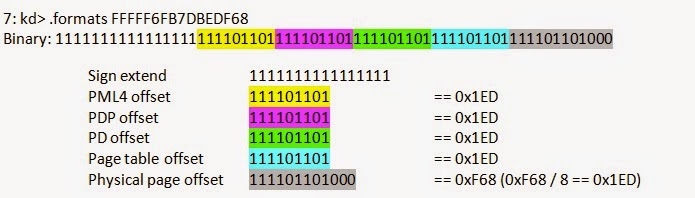
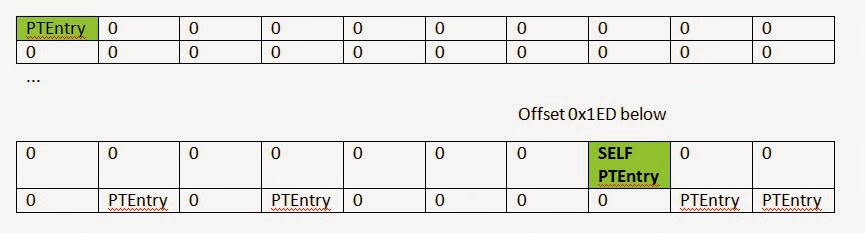
The magic of this technique comes from the propensity of all OS (at least Windows, Linux, and BSD) to organize their page tables into virtual memory. That way they can use virtual addresses to edit PTEs instead of physical memory addresses.
Shane Macaulay
- BlockWatch™
- DEF CON 22 Presentation: “Weird-machine Motivated Practical Page Table Shellcode & Finding Out What’s Running on Your System
- PMODUMP
- Windows Debugging Blog on understanding !PTE