

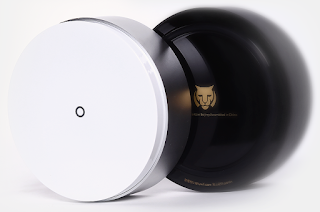
A Wonderful (and !Secure) Router from China
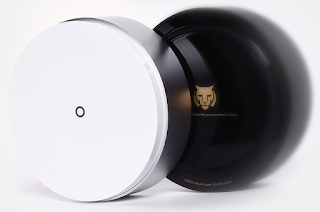
The BHU WiFi uRouter, manufactured and sold in China, looks great – and it contains multiple critical vulnerabilities. An unauthenticated attacker could bypass authentication, access sensitive information stored in its system logs, and in the worst case, execute OS commands on the router with root privileges. In addition, the uRouter ships with hidden users, SSH enabled by default and a hardcoded root password…and injects a third-party JavaScript file into all users’ HTTP traffic.
In this blog post, we cover the main security issues found on the router, and describe how to exploit the UART debug pins to extract the firmware and find security vulnerabilities.
Souvenir from China
During my last trip to China, I decided to buy some souvenirs. By “souvenirs”, I mean Chinese brand electronic devices that I couldn’t find at home.
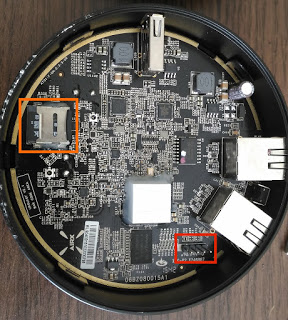
I booted the device and watched my terminal:
I pressed c to access the command line (2). Since it’s using U-Boot (as specified in the serial output), I could modify the bootargs parameter and pop a shell instead of running the init program:
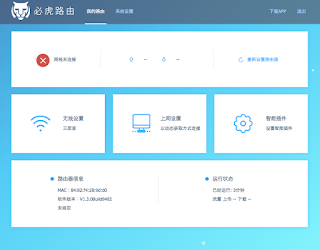
My first objective was to understand which software is handling the administrative web interface, and how. Here’s the startup configuration of the router:
The administrative web interface relies on two binaries:
- cgiPage.cgi, which seems to handle the web panel home page (http://192.168.62.1/cgi-bin/cgiPage.cgi?pg=urouter (resource no longer available))
- cgiSrv.cgi, which handles the administrative functions (such as logging in and out, querying system information, or modifying system configuration
The cgiSrv.cgi binary appeared to be the most interesting, since it can update the router’s configuration, so I started with that.
Although the binary is stripped of all debugging symbols such as function names, it’s quite easy to understand when starting from the main function. For analysis of the binaries, I used IDA:
/* [omitted] */
The main function starts by calling getenv (6) to retrieve the request method stored in the environment variable “REQUEST_METHOD” (7). Then it calls strcmp (9) to compare the REQUEST_METHOD value (8) with the string “POST” (10). If the strings are equal (11), the function in (12) is called.
Let’s start with handle_get, which looks simpler than does the handler for POST requests.
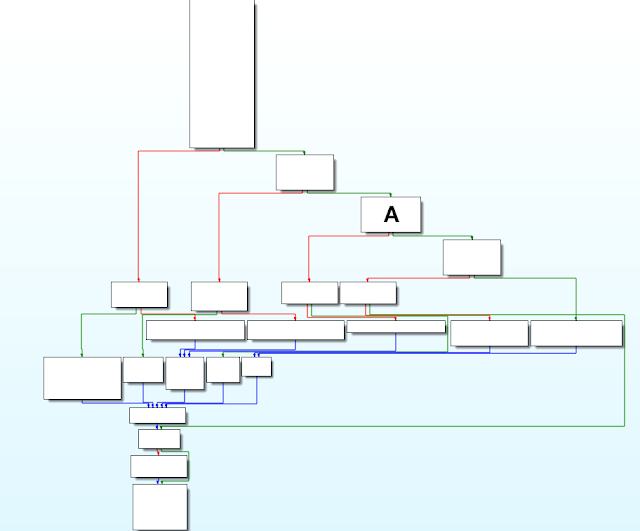
Focusing on Block A:
In Block A, handler_get checks for the string “file” (13) in the URL parameters (15) by calling find_val (14). If the string appears (16), the function get_file_handler is called (17).
- page=[<html page name>] Append “.html” to the HTML page name
- Open the file and return its content
- If you’re wondering, yes, it is vulnerable to path traversal, but restricted to .html files. I could not find a way to bypass the extension restriction.
- Access the configuration name
- Return the value in XML format
- Access /var/syslog
- Open the file and return its content
- Return the first and last letters of the admin password (reducing the entropy of the password and making it easier for an attacker to brute-force)
Did We Forget to Invite Authentication to the Party? Zut…
Request:
Connection: close
Response:
Jan 1 08:02:19 HOSTNAME local0.warn dms[549]: User:admin sid:2jggvfsjkyseala index:3 login
…Or maybe they do. As seen above, these logs contain, among other information, the session ID (SID) value of the admin cookie. If we use that cookie value in our browser, we can hijack the admin session and reboot the device:
Response:
But wait, there’s more! In the (improbable) scenario where the admin has never logged into the router, and therefore doesn’t have an SID cookie value in the system logs, we can still use the hardcoded SID: 700000000000000. Did you notice it in the system log we saw earlier?
Request to check which user we are:
Response:
Could It Be More Broken?
In the snippet above, we can find a similar structure as in the GET handler: a cascade-like series of blocks. In Block A, we have the following:
Block B does the following:
It calls the strcmp function (30) with the result of find_val from Block A as the first parameter (31). The second parameter is the string “reboot” (29). If the op parameter has the value reboot, then it moves to Block C:
It first calls a function I renamed get_cookie_sid (32), passes the returned value to dml_dms_ucmd (33) and calls it (34). Then it moves on:
For instance, when no SID cookie is specified, we observe the following response from the server. Request without any cookie:
Response:
- Receive POST request ‘/op=<name>’
- Call get_cookie_sid
- Call dms_dms_ucmd
First, we check to see what get_cookie_sid does:
The returned value then passes as the first parameter when calling dml_dms_ucmd (implemented in the libdml.so library). The authentication check surely must be in this function, right? Let’s have a look:
Response:
Yes, it does mean that whatever SID cookie value you provide, the router will accept it as proof that you’re an authenticated user!
From Admin to Root
- Provide any SID cookie value
- Read the system logs and use the listed admin SID cookie values
- Use the hardcoded hidden 700000000000000 SID cookie value
Our next step is to try elevating our privileges from admin to root user.
We have analyzed the POST request handler and understood how the op requests were processed, but the POST handler can also handle XML requests:
LOAD:00402FAC move $a3, $s2
When receiving a request with a content type (45) containing text/xml (46), the POST handler retrieves the SID cookie value (47) and calls dml_dms_uxml (48), implemented in libdml.so. Somehow, dml_dms_uxml is even nicer than dml_dms_ucmd:
The function dml_dms_uxml is responsible for parsing the XML in the request body and finding the corresponding callback function. For instance, when receiving the following XML request:
The function dml_dms_uxml will check the cmd parameter and find the function handling the traceroute command. The traceroute handler is defined in libdml.so as well, within the function dl_cmd_traceroute:
First, dl_cmd_traceroute tries to retrieve the value of the parameter named address or addr (54) in the XML data (52) by calling conf_find_value (53) and stores it in s0 (55).
Moving forward:
Let’s have a look at dl_cmd_traceroute_th:
Using our previous request, dl_cmd_traceroute_th will execute the following:
system(“/bin/script/tracepath.sh 127.0.0.1”)
As you may have already determined, there is absolutely no sanitization of the XML address value, allowing an OS command injection. In addition, the command runs with root privileges:
</cmd>
When accessing:
root
At this point, we can do anything:
- Eavesdrop the traffic on the router using tcpdump
- Modify the configuration to redirect traffic wherever we want
- Insert a persistent backdoor
- Brick the device by removing critical files on the router
Broken and Shady
For instance, on boot the BHU WiFi uRouter enables SSH by default:
It also rewrites its hardcoded root-user password every time the device boots:
It’s installed on the uRouter:
The BHU WiFi uRouter is using Privoxy with a configured filter that I would not describe as “enhancing privacy” at all:
s@</body>@<script type=’text/javascript’ src=’http://chdadd.100msh.com/ad.js’></script></body>@g
Sadly, the above URL is no longer accessible. The domain hosting the JS file does not respond to non-Chinese IP addresses, and from a Chinese IP address, it returns a 404 File Not Found error.
Nevertheless, a local copy of ad.js can be found on the router under /usr/share/ad/ad.js. Of course, the ad.js downloaded from the Internet could do anything; yet, the local version does the following:
- Injects a DIV element at the bottom of the page of all websites the victim visits, except bhunetworks.com.
- The DIV element embeds three links to different BHU products: http://bhunetworks.com/BXB.asp
- http://bhunetworks.com/bms.asp
- http://bhunetworks.com/planview.asp?id=64&classid=3/
In addition, uRouter loads a very suspicious kernel module on startup:
/* [omitted] */
Conclusion
The BHU WiFi uRouter I brought back from China is a specimen of great physical design. Unfortunately, on the inside it demonstrates an extremely poor level of security and questionable behaviors.
An attacker could:
- Bypass authentication by providing a random SID cookie value
- Access the router’s system logs and leverage their information to hijack the admin session
- Use hardcoded hidden SID values to hijack the DMS user and gain access to the admin functions
- Inject OS commands to be executed with root privileges without requiring authentication
In addition, the BHU WiFi uRouter injects a third-party JavaScript file into its users’ HTTP traffic. While it was not possible to access the online JavaScript file, injection of arbitrary JavaScript content could be abused to execute malicious code into the user’s browser. Further analysis of the suspicious BHU WiFi kernel modules loaded on the uRouter at startup could reveal even more issues.